Wedding QR code: The complete guide to gathering all your guests' photos
Published on June 23, 2026 · The Fotelya team
A wedding QR code serves one simple purpose: to let every guest upload their photos to a shared album with a single scan, without installing anything. Here’s how it works, how to create one, where to place it for maximum use, what it costs, and most importantly, the criteria to consider before entrusting the memories of your special day to a service.
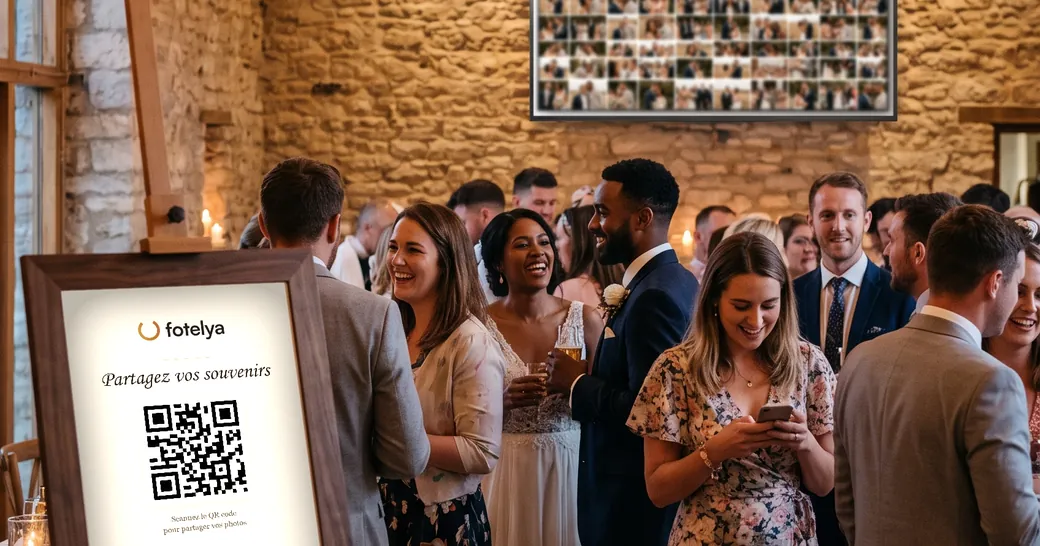
What a wedding QR code is, and what it replaces
A wedding QR code is a scannable code that opens, in the phone’s browser, the upload page of a private album dedicated to your wedding. The guest points their phone camera at the code, taps the link that appears, selects their images, and they’re added to the shared album. No app installation or account creation is required.
The problem it solves
The day after a wedding, couples usually have only a handful of photos: those that a few close friends remembered to send. Yet the rest of the memories exist, scattered across the phones of a hundred people who will never send them, or who will send compressed versions in a group chat six months later.
The professional photographer captures the day with their eye and expertise, but they can’t be in two places at once or see the evening from the cousins’ table. The QR code doesn’t replace the photographer: it captures what no one else could.
What it replaces in practice
- The group chat that compresses photos and gets lost after three days.
- The phrase “send me your photos” repeated fifty times, followed by ten uploads.
- Disposable cameras that were never developed, or developed blurry.
- The USB drive you promise to exchange but never do.
How it works, from scan to final download
For guests, in about thirty seconds
The guest opens their phone camera, points it at the QR code placed on the table, and taps the notification that appears. A web page opens. They select their photos and videos, confirm, and it’s done. No app, no password, no email required. This simplicity lets a grandmother participate just as easily as a teenager.
For couples, before and after the big day
Before the wedding, you create the album and get your QR code to print on posters and place cards. During the evening, the album fills up in real time: you can follow it on your phone or project it on a screen in the venue. Afterward, you download everything in a full-resolution archive.
The detail that makes all the difference: original quality
A photo sent in a group chat loses much of its definition. It may look fine on a phone screen, but it becomes unusable for printing or a photo album. A serious sharing service preserves files in their original quality, exactly as they came out of the guest’s phone. This is the difference between a memory you glance at once and one you print and cherish.
Create your wedding QR code: the four-step method
1. Create the album, not just the code
A free QR code generator produces a code that points to an address. It doesn’t create an album, storage, or an upload page. What you need is a service that hosts the album and provides the corresponding code. Creation takes just a few minutes.
2. Test the scan before printing
Scan your own code with two different phones, one recent and one older, under real conditions. Upload a test photo. This two-minute check prevents the only truly serious scenario: a hundred printed posters with a code that doesn’t work.
3. Print in the right size
A QR code should measure at least four centimeters on each side for a place card read at arm’s length, and at least fifteen centimeters for a poster read from one meter away. Leave a white margin around the code: without it, scanning becomes unreliable. Avoid glossy paper under evening lighting, which reflects light and prevents focus.
4. Write what the code does
A QR code alone doesn’t invite action. A short phrase above it changes everything: “Share your wedding photos here.” The guest must understand in one second what happens if they scan. Without this phrase, some guests assume it’s the menu or seating plan and won’t scan.
Where to place the QR code on the big day
Participation depends almost entirely on placement. A single code at the entrance will be seen by everyone but used by very few. Place multiple codes at points where people have their phones in hand.
| Location | Why it works | Recommended format |
|---|---|---|
| On each table | The meal moment is the most favorable: guests are seated, relaxed, phone within reach | Menu or small stand |
| At the bar | People wait there, chat, naturally take out their phones | A5 poster |
| At the entrance | Capture guests as soon as they arrive, when curiosity is at its peak | A3 poster or larger |
| Near the photobooth or photo backdrop | Guests have just taken photos there: the sharing gesture is immediate | A5 poster |
| In the restrooms | Unexpected location yet one of the most effective: everyone passes by, alone, with their phone | Framed card |
| On the invitation or booklet | Prepare guests before the big day | Small printed code |
The live photo wall, the best reminder
If the venue has a screen or video projector, displaying photos as they arrive transforms participation. Each guest who sees their photo appear on the big screen becomes an ambassador: people around ask how to do it. This is the most effective reminder, and it doesn’t require anyone to make an announcement over the microphone.
How much does a wedding QR code cost
The code itself costs nothing: it’s an image. What has a cost is what’s behind it, namely file hosting, bandwidth on the wedding night, and storage duration.
Free offers
They are perfect for a birthday or an evening among close friends. For a wedding, take a close look at three common limitations: reduced storage space, a watermark on images, and automatic deletion after a few weeks. A hundred-guest wedding easily generates several thousand photos and videos.
Paid offers
They are generally paid once, for the event, not by subscription. As a benchmark, Fotelya offers a free plan (2 GB, about 400 photos, 30-day retention), an Event plan at €49 per event (unlimited guests, 25 GB or about 5,000 photos, live wall, no watermark, 6-month retention) and a Premium plan at €89 (white label, voice guestbook, 75 GB, 12-month retention). Venues and organizers have a dedicated subscription at €39 per month for unlimited events.
The real cost criterion: the download window
The question to ask is not just “how many gigabytes”, but “how long do I have to retrieve everything”. After a wedding come the honeymoon, thank-you notes, going back to work. Thirty-day retention is short. Check the automatic deletion date and download the full archive well in advance.
QR code, photo booth or app: what to choose
These three approaches don’t target the same goal, and they complement each other very well.
| Approach | What it brings | The limitation |
|---|---|---|
| QR code to an album | Collects photos from all guests, from all angles, throughout the day. Moderate cost, no logistics | Depends on guests’ goodwill, so on placement and signage |
| Photo booth | Strong animation, instant paper prints, decor and accessories | High rental cost, bulk, only captures what happens in front of the booth |
| App to install | Advanced features for guests who go all the way with the installation | Every installation step causes participants to drop off. With guests of all ages, the loss is considerable |
The photo booth and the QR code complement each other well: the booth creates the excitement, the QR code captures everything else, including what the booth will never see. On the other hand, asking guests to install an app is the surest way to reduce participation, especially among those least comfortable with technology, who are often the ones whose photos you most want to collect.
Your photos and your privacy: the questions to ask before choosing
Wedding photos are personal data, and among the most intimate: your family, your friends, your children. Before entrusting these files to a service, three questions deserve clear answers, not just a reassuring mention on a homepage.
Where are the photos physically stored?
Hosting in the European Union places your files under GDPR, with concrete rights of access and deletion. Hosting outside Europe may fall under laws that allow administrative access without your knowledge. This information must be public and verifiable, not inferred.
Who can see the album?
A wedding album has no reason to be publicly accessible or indexed by a search engine. Access must go through your QR code or a link accompanied by a code. Also check if the service reserves any usage rights over your images, for example for promotional purposes: you must remain the owner of your photos.
What happens to the files afterwards?
Ask for the exact retention period, how deletion is handled, and if you can delete the album yourself before the deadline. Definitive deletion on a known date is better than unlimited storage whose administration in five years will be unknown.
The mistakes that cost the most photos
A single code, at the entrance
Seen by all, used by almost no one. Upon arrival, guests greet, find their seats, and do not take out their phones. Place codes in multiple locations.
A code without explanation
A bare QR code is ambiguous: menu, seating plan, gift. A five-word phrase above it multiplies scans.
Not anticipating the network
Many wedding venues, castles, barns, country estates have poor mobile coverage and wifi that becomes saturated as soon as a hundred people connect. Check that the service stores uploads on the guest’s phone and resumes them automatically when the connection returns. Without this, photos taken at the best moments of the evening are simply lost.
Forgetting to download
The most frequent, and most definitive, mistake. Add a reminder in your calendar, the day after the wedding, for downloading the complete archive, well before automatic deletion. Then keep a copy on an external drive or personal storage.
The day-of checklist
- The code has been scanned and tested with two different phones, including an older one.
- A test photo has actually been uploaded, then deleted.
- The displays are printed in a large enough size, on matte paper, with a white margin.
- Each display carries a short sentence explaining what the code is for.
- Codes are placed in at least four different locations.
- A trusted person, such as a witness or close friend, knows to remind guests mid-evening.
- The venue’s screen displays the live wall, if possible.
- The date for downloading the archive is noted in the calendar.